Last time I showed You how to control 1 digit 7 segment LED display with Arduino. This time it’s not 1, but 4 digits. To connect 1 digit to Arduino we had to use 8 ports, so to connect 4 digits we need to have 4×8=32? Not necessary. Where is a way to use much less ports, it’s called multiplexing. Using multiplexing at one time only one digit is active(e.g. for 2ms). All digits is turned on is serial, but because human’s eye is inert we have illusion, that all digits are lighting at same time.
As You can see form schematic bellow with multiplexing implemented we required only 4 additional ports compared to 1 digit circuit, total – 12.
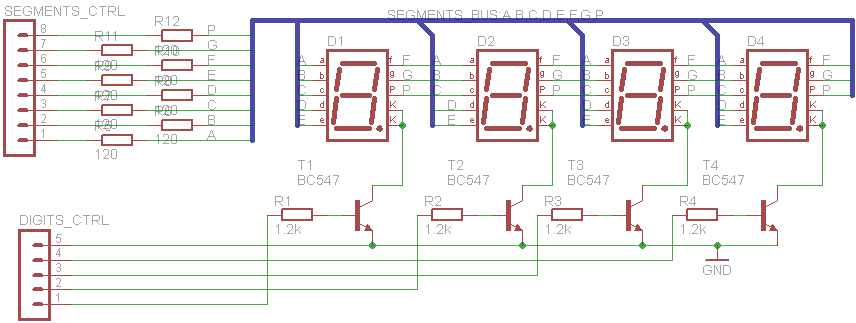
Because at the same time only one digit will be on All 4 digits segments inputs are connected together. By connecting digits common cathodes to ground we are controlling which digit shall be turned on. Atmega 1280 µCPU port can drain(receive) maximum 40 mA current. If all one digits segments are on, we are having 20×8= 160 mA that is to much, so we can’t to connect common cathodes directly to Arduino ports. Therefore I have used BC547 NPN transistors as switches. Transistor is opened, when positive voltage is applied at the base.
Let’s see the code.
It’s modified version of earlier commented code, so I’m lazy to explain some of the code again.
Modified code have definition of ports that(with transistors) are controlling digits.
#define GND1 52

#define GND2 53

#define GND3 50

#define GND4 51
And they are outputs
pinMode(GND1, OUTPUT);

pinMode(GND2, OUTPUT);
pinMode(GND3, OUTPUT);

pinMode(GND4, OUTPUT);
There new function to display all 4 digits. You can see it have 4 parts, to display 4 digits.
void showdigits (int number)
{

// e.g. we have "1234"
showdigit(number/1000);  // segments are set to display "1"
digitalWrite(GND1, HIGH); // first digit on,
digitalWrite(GND2, LOW); // other off
digitalWrite(GND3, LOW);
digitalWrite(GND4, LOW);

delay (1);

number = number%1000;  // remainder of 1234/1000 is 234
digitalWrite(GND1, LOW); // first digit is off
 showdigit(number/100); //// segments are set to display "2"
digitalWrite(GND2, HIGH); // second digit is on
 delay (1); // and so on....

number =number%100;
digitalWrite(GND2, LOW);
showdigit(number/10);
digitalWrite(GND3, HIGH);
delay (1);

number =number%10;
digitalWrite(GND3, LOW);
showdigit(number);
digitalWrite(GND4, HIGH);
 delay (1);

};
My new target is to make digital clock of these displays using timer for accuracy.
And full code goes here:
/*
7 LED segments demo counter program from electronicsblog.net.
If You share/use this code elsewhere on the internet please mention this code source.
*/

// segment | Arduino board PIN number

#define G 22
#define F 23
#define A 24
#define B 25
#define E 26
#define D 27
#define C 28
#define DP 29

// Commonn cathodes control
#define GND1 52
#define GND2 53
#define GND3 50
#define GND4 51

int timer=0;

int i=0;
// functions to display digits

void digit0 () {
// for 0 needed to turn ON F A B C D E segments, so:

digitalWrite(A, HIGH);
digitalWrite(B, HIGH);
digitalWrite(C, HIGH);
digitalWrite(D, HIGH);
digitalWrite(E, HIGH);
digitalWrite(F, HIGH);

//////////////////////// G segment should be turn OFF
digitalWrite(G, LOW);

};

void digit1 () {

digitalWrite(A,LOW);
digitalWrite(B, HIGH);
digitalWrite(C, HIGH);
digitalWrite(D, LOW);
digitalWrite(E, LOW);
digitalWrite(F, LOW);
digitalWrite(G, LOW);
};

void digit2 () {

digitalWrite(A,HIGH);
digitalWrite(B, HIGH);
digitalWrite(C, LOW);
digitalWrite(D, HIGH);
digitalWrite(E, HIGH);
digitalWrite(F, LOW);
digitalWrite(G, HIGH);
};

void digit3 () {

digitalWrite(A,HIGH);
digitalWrite(B, HIGH);
digitalWrite(C, HIGH);
digitalWrite(D, HIGH);
digitalWrite(E, LOW);
digitalWrite(F, LOW);
digitalWrite(G, HIGH);
};

void digit4 () {

digitalWrite(A,LOW);
digitalWrite(B, HIGH);
digitalWrite(C, HIGH);
digitalWrite(D, LOW);
digitalWrite(E, LOW);
digitalWrite(F, HIGH);
digitalWrite(G, HIGH);
};

void digit5 () {

digitalWrite(A,HIGH);
digitalWrite(B, LOW);
digitalWrite(C, HIGH);
digitalWrite(D, HIGH);
digitalWrite(E, LOW);
digitalWrite(F, HIGH);
digitalWrite(G, HIGH);
};

void digit6 () {

digitalWrite(A,HIGH);
digitalWrite(B, LOW);
digitalWrite(C, HIGH);
digitalWrite(D, HIGH);
digitalWrite(E, HIGH);
digitalWrite(F, HIGH);
digitalWrite(G, HIGH);
};

void digit7 () {

digitalWrite(A,HIGH);
digitalWrite(B, HIGH);
digitalWrite(C, HIGH);
digitalWrite(D, LOW);
digitalWrite(E, LOW);
digitalWrite(F, LOW);
digitalWrite(G, LOW);
};

void digit8 () {

digitalWrite(A, HIGH);
digitalWrite(B, HIGH);
digitalWrite(C, HIGH);
digitalWrite(D, HIGH);
digitalWrite(E, HIGH);
digitalWrite(F, HIGH);
digitalWrite(G, HIGH);

};

void digit9 () {

digitalWrite(A, HIGH);
digitalWrite(B, HIGH);
digitalWrite(C, HIGH);
digitalWrite(D, HIGH);
digitalWrite(E, LOW);
digitalWrite(F, HIGH);
digitalWrite(G, HIGH);

};

//function to display digit from inputed int

void showdigit (int digit)

{

 switch (digit) {

 case 0:
 digit0 ();
 break;

 case 1:
 digit1 ();
 break;

 case 2:
 digit2 ();
 break;

 case 3:
 digit3 ();
 break;

 case 4:
 digit4 ();
 break;

 case 5:
 digit5 ();
 break;

 case 6:
 digit6 ();
 break;

 case 7:
 digit7 ();
 break;

 case 8:
 digit8 ();
 break;

 case 9:
 digit9 ();
 break;

 default:

 break;

 };

};

// showing 4 digits
void showdigits (int number)
{

// e.g. we have "1234"
showdigit(number/1000);  // segments are set to display "1"
digitalWrite(GND1, HIGH); // first digit on,
digitalWrite(GND2, LOW); // other off
digitalWrite(GND3, LOW);
digitalWrite(GND4, LOW);

delay (1);

number = number%1000;  // remainder of 1234/1000 is 234
digitalWrite(GND1, LOW); // first digit is off
 showdigit(number/100); //// segments are set to display "2"
digitalWrite(GND2, HIGH); // second digit is on
 delay (1); // and so on....

number =number%100;
digitalWrite(GND2, LOW);
showdigit(number/10);
digitalWrite(GND3, HIGH);
delay (1);

number =number%10;
digitalWrite(GND3, LOW);
showdigit(number);
digitalWrite(GND4, HIGH);
 delay (1);

};

void setup()

{

pinMode(A, OUTPUT);
pinMode(B, OUTPUT);
pinMode(C, OUTPUT);
pinMode(D, OUTPUT);
pinMode(E, OUTPUT);
pinMode(F, OUTPUT);
pinMode(G, OUTPUT);
pinMode(DP, OUTPUT);

pinMode(GND1, OUTPUT);
pinMode(GND2, OUTPUT);
pinMode(GND3, OUTPUT);
pinMode(GND4, OUTPUT);

};
void loop ()

{
  timer++;

 showdigits (i);

  if (timer==10) {

timer=0;

i++;

if (i>10000) {i=0;};

if (i%2) { digitalWrite(DP, HIGH); }

else  {digitalWrite(DP, LOW); };

  };

};
