Arduino FM receiver with TEA5767


Old wish to make digitally controlled FM tuner come true when I found on Ebay cheap module with TEA5767 (Low-power FM stereo radio for handheld applications).
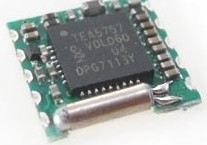
This module size is only 11.2mm x 11mm. TEA 5767 supports I2C.  Pinout and wiring:
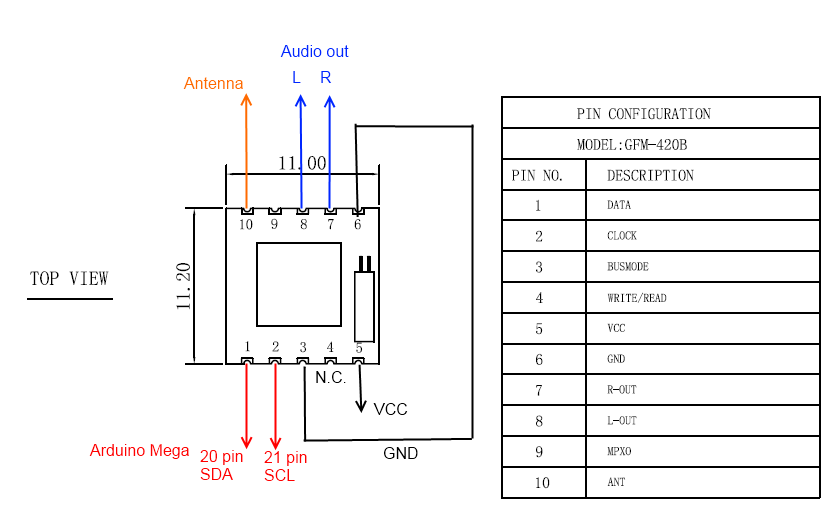
For antenna i have used just 75 cm long wire, because that is 1/4 of wavelength at 100 MHz. TEA5767 doesn’t have audio amplifier, sound output level is very low, headphone can not be connected directly. During testing i had connected audio output to PC audio system.

Writing to TEA5767

Radio chip is controlled by writing 5 bytes one by one. During writing TEA5767  IC2 address is 0×60, reading – 0×61. Arduino IDE supports only 7 bit address ant last bite is assigned automatically,  so  in code 0×60 is used as address.

   frequency=87.5; //starting frequency

   frequencyB=4*(frequency*1000000+225000)/32768; //calculating PLL word

   frequencyH=frequencyB>>8;

  frequencyL=frequencyB&0XFF;

  delay(100);

  Wire.beginTransmission(0x60);   //writing TEA5767

  Wire.send(frequencyH);
  Wire.send(frequencyL);
  Wire.send(0xB0);
  Wire.send(0x10);
  Wire.send(0x00);
  Wire.endTransmission();

This is code responsible for starting frequency of FM receiver.

Frequency is controlled by 14 bit word, that is written to two 8 bit registers.

Example of word calculating is given in datasheet.
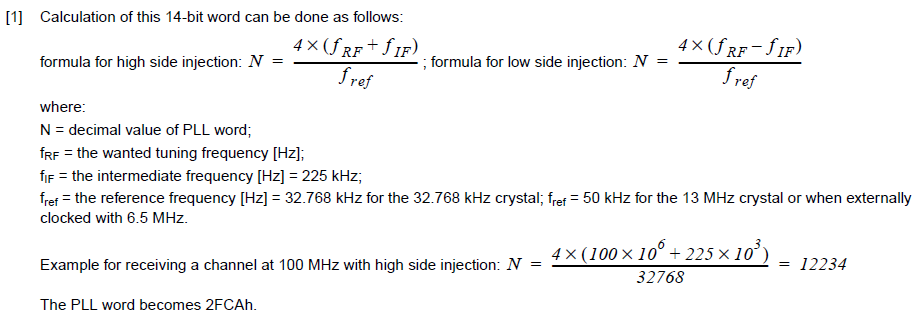
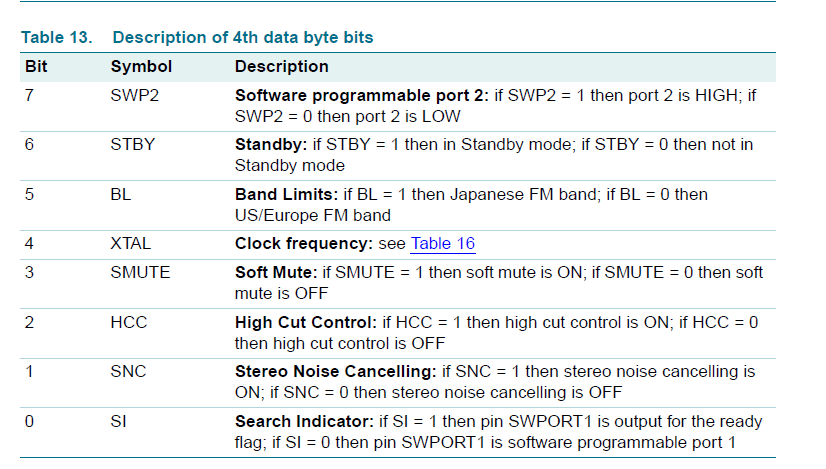
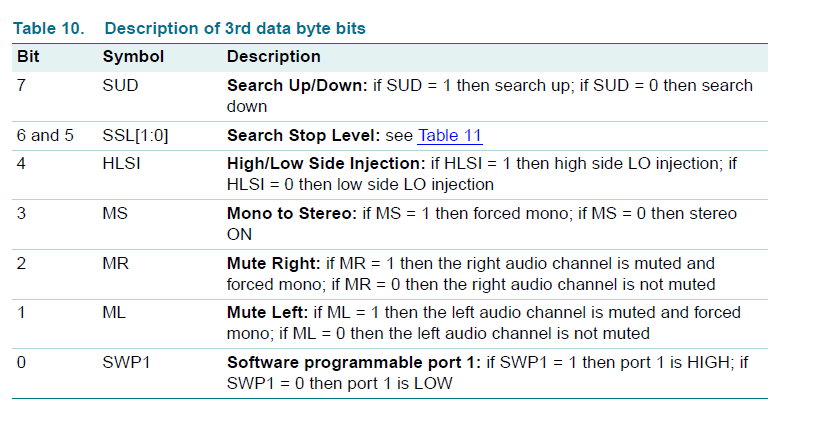
3 byte (0xB0): high side LO injection is on,.
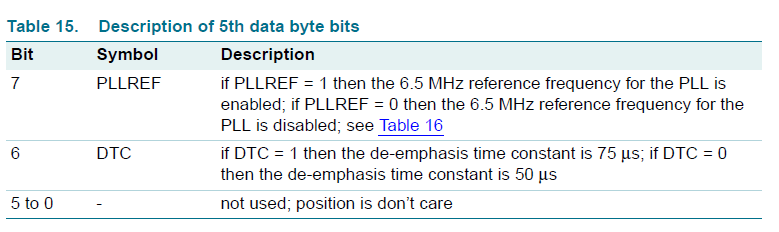
4 byte (0×10) : Xtal is 32.768 kHz

5 byte (0×00)

Reading TEA5767

Reading is performed every time in the loop

  Wire.requestFrom(0x60,5); //reading TEA5767

  if (Wire.available()) 

  {
    for (int i=0; i<5; i++) {

      buffer[i]= Wire.receive();
    }

    freq_available=(((buffer[0]&0x3F)<<8)+buffer[1])*32768/4-225000;

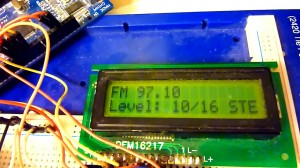
    lcd.print("FM ");

    lcd.print((freq_available/1000000));

    frequencyH=((buffer[0]&0x3F));

    frequencyL=buffer[1];

    if (search_mode) {

      if(buffer[0]&0x80) search_mode=0;

    }

    if (search_mode==1) lcd.print(" SCAN");
    else {
      lcd.print("       ");
    }

    lcd.setCursor(0, 1);

    lcd.print("Level: ");
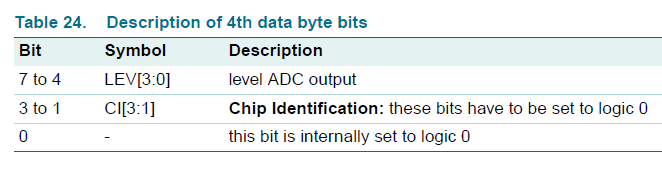
    lcd.print((buffer[3]>>4));
    lcd.print("/16 ");

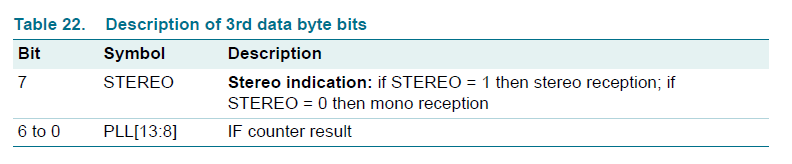
    if (buffer[2]&0x80) lcd.print("STEREO   ");
    else lcd.print("MONO   ");

  }

1 byte has information about search status and part of frequency word
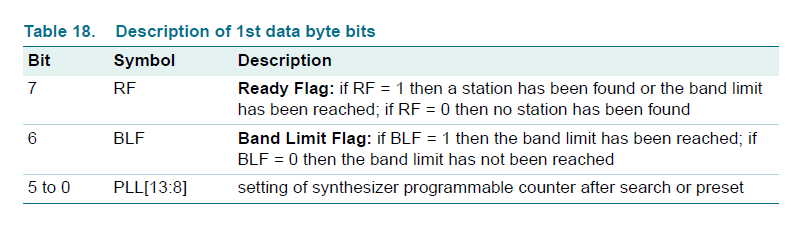
2 byte has remaining information about frequency

3 byte – Stereo indicator
4 byte – Signal level
5 byte – reserved

Search

Search mode is on by pressing up or down buttons longer. TEA 5767 stars scanning up or down with 100kHz steps.  Search stop level can be selected.

1 byte (Search mode on/off)

2 byte (Search up/down , stop level)

If station if found ready flag is on (1 byte).

Demo

All code

/// Arduino FM receiver with TEA5767 http://www.electronicsblog.net
#include <Wire.h>
#include <LiquidCrystal.h>

unsigned char search_mode=0;

int b=0;
int c=0;

#define Button_next 30
#define Button_prev 31

unsigned char frequencyH=0;
unsigned char frequencyL=0;

unsigned int frequencyB;
double frequency=0;

double freq_available=0; 

LiquidCrystal lcd(12, 11, 5, 4, 3, 2); 

void setup()   { 

  Wire.begin();
  lcd.begin(16, 2);

  /// buttons  

  pinMode(Button_next, INPUT);
  digitalWrite(Button_next, HIGH); //pull up resistor

  pinMode(Button_prev, INPUT);
  digitalWrite(Button_prev, HIGH); //pull up resistor

  frequency=87.5; //starting frequency

  frequencyB=4*(frequency*1000000+225000)/32768; //calculating PLL word

  frequencyH=frequencyB>>8;

  frequencyL=frequencyB&0XFF;

  delay(100);

  Wire.beginTransmission(0x60);   //writing TEA5767

  Wire.send(frequencyH);
  Wire.send(frequencyL);
  Wire.send(0xB0);
  Wire.send(0x10);
  Wire.send(0x00);
  Wire.endTransmission();

  delay(100);

}

void loop()
{

  unsigned char buffer[5];

  lcd.setCursor(0, 0);

  Wire.requestFrom(0x60,5); //reading TEA5767

  if (Wire.available()) 

  {
    for (int i=0; i<5; i++) {

      buffer[i]= Wire.receive();
    }

    freq_available=(((buffer[0]&0x3F)<<8)+buffer[1])*32768/4-225000;

    lcd.print("FM ");

    lcd.print((freq_available/1000000));

    frequencyH=((buffer[0]&0x3F));

    frequencyL=buffer[1];

    if (search_mode) {

      if(buffer[0]&0x80) search_mode=0;

    }

    if (search_mode==1) lcd.print(" SCAN");
    else {
      lcd.print("       ");
    }

    lcd.setCursor(0, 1);

    lcd.print("Level: ");
    lcd.print((buffer[3]>>4));
    lcd.print("/16 ");

    if (buffer[2]&0x80) lcd.print("STEREO   ");
    else lcd.print("MONO   ");

  }

  ///// buttons read

  //////////// button_next////////// 
  if (!digitalRead(Button_next)&&!b) {

    frequency=(freq_available/1000000)+0.05;

    frequencyB=4*(frequency*1000000+225000)/32768+1;

    frequencyH=frequencyB>>8;
    frequencyL=frequencyB&0XFF;   

    Wire.beginTransmission(0x60);   

    Wire.send(frequencyH);
    Wire.send(frequencyL);
    Wire.send(0xB0);
    Wire.send(0x1F);
    Wire.send(0x00); 

    Wire.endTransmission(); 

    //////////////////////

    b=100;

  };

  if (!digitalRead(Button_next)&&b==1) {

    ///scannnn UP

    search_mode=1;

    Wire.beginTransmission(0x60);   

    Wire.send(frequencyH+0x40);
    Wire.send(frequencyL);
    Wire.send(0xD0);
    Wire.send(0x1F);
    Wire.send(0x00); 

    Wire.endTransmission();

    /////////////////

    b=100;

  };    

  if (!b==0) b--;

  //////////// button_prev////////// 
  if (!digitalRead(Button_prev)&&!c) {

    frequency=(freq_available/1000000)-0.05;

    frequencyB=4*(frequency*1000000+225000)/32768+1;

    frequencyH=frequencyB>>8;
    frequencyL=frequencyB&0XFF;

    Wire.beginTransmission(0x60);   

    Wire.send(frequencyH);
    Wire.send(frequencyL);
    Wire.send(0xB0);
    Wire.send(0x1F);
    Wire.send(0x00); 

    Wire.endTransmission(); 

    c=100;

  };

  if (!digitalRead(Button_prev)&&c==1) {

    ///scannnn DOWN

    search_mode=1;

    Wire.beginTransmission(0x60);   

    Wire.send(frequencyH+0x40);
    Wire.send(frequencyL); 

    Wire.send(0x50);
    Wire.send(0x1F);
    Wire.send(0x00);
    Wire.endTransmission();   

    c=100;

  };          

  if (!c==0) c--;

  ////////////////////

}

Code have some problem with frequency control/indication. Button press doesn’t always adds/subtracts exactly 0,05 MHz. Also later i found in application note, that after search frequency word must be rounded and sent back to tuner, because with 32768 Hz Xtal search step is not 100 kHz, but 98.304 kHz.

  • Dfa_radar

    Wow very good !
    i was looking for such a circuit, and wanted to add it on my bill on Digikey but i didn’t found anything..
    now i bought from ebay this one !
    Thank very much, and well done for your radio !

    • Dfa_radar

      hi
      i get strange problem : writing isok, i know i can change stations and sound ok but no way to read !
      SDA repeats SCL !!!

      what i do to read :

      - START : SDA=0 then SCL=0
      - address : 0xC1 -> i get a ’0′ ack (sign that TEA “see” the address and recognises itself)
      - just after the ack CLK pulse, series of pulses CLK (8 + 1 for ack). i let ack to 0 as master.

      for the 5 bytes i try to read i get the exact pattern of CLK : two idential waves ( SCL=SDA)

      I can”t figure out how this happend.
      I got the exact same module as you, wired pin3 (BUSMODE) to GND (and i can write commands but not read)

      i tried to change the address , and then i get no ack in the first byte ( adr+read) -> TEA is correctly understanding the READ command.

      Did anyone have the same issue ? could you please help me ?
      Thank you so much.

      • Dfa_radar

        issue solved, software I2C strange sometimes …

        what do you mean by “PLL word rounded” ? the pll word is an integer word not ?

  • Schatz_9_8

    Great job!!! :) i was wondering that it is the same if i connect the tea5767 to my stm32 board? what will be the difference?

    • http://www.electronicsblog.net/ Darius

      Thanks :) I don’t now what IDE you would be using, but main algorithm of code should be the same.

  • http://twitter.com/TomCesar2 TomCesar

    I used this page to develop my FM with a PIC16F877A and a 
    TEA5767 – thanks a lot for this posting

    • muhammad ateeb

      i have implemented total kit of tea5767 which works nicely read and write operation works correctly but i have audio problem i also post my code

      code:#include#include #fuses NOWDT,NOPROTECT,NOLVP,XT

      #use delay(clock = 4000000)#use i2c(MASTER, SDA=PIN_C4, SCL=PIN_C3, address=0×60)#use rs232(baud=1200, xmit=PIN_C6,rcv=PIN_C7)

      float tuned_frequency;long frequencyH,frequencyL;

      void radioInit(void); void radioStatus(void);

      void main() {

          int j;    long pll;    float  freq_available;    delay_ms(1000);    output_d(0×03);    //printf(“Enter the Frequency in Mhz:(87.5~108)Mhz”);    //input_frequency=getc();    //tuned_frequency=atof(input_frequency);

          printf(“FreqRequested,FreqReceived,RSSLevelrn”);    for(tuned_frequency=87.51;tuned_frequency>8) & 0xFF; // higher 6-bit

              //printf(” nrdata1=%04X “,frequencyH);        //printf(” nrdata1=%04X “,frequencyL);        freq_available=((((((frequencyH&0x3F)<<8)|frequencyL)*32.768)/4)-225)/1000;        printf("nr%f",freq_available);        delay_ms(5);

               //printf("Tunningnr");          radioInit();

              for( j=0;j<1;j++)        {              radioStatus();            delay_ms(5);        }     }

          while(TRUE) // inifinte loop after FM scan complete    {        delay_ms(5);    }}

      void radioInit() {       i2c_start();    // Start condition     //printf("nrstart");      while(i2c_write(0xC0));// Device writing address     //printf("nr address");     while(i2c_write(frequencyH));     //printf("nr byte1:%X",frequencyH);     while(i2c_write(frequencyL));     //printf("nr byte2:%X",frequencyL);     while(i2c_write(0×00));     //printf("nr byte3");     while(i2c_write(0×10));     //printf("nr byte4");     while(i2c_write(0×00));     //printf("nr byte5");     i2c_stop();     // Stop condition }

      void radioStatus() {     int i;    long data[5];    int level;    float  freq_available;        //printf("nrReading");         i2c_start();    // Start condition     i2c_write(0xC1);// Device address         data[0] = i2c_read();    data[1] = i2c_read();     data[2] = i2c_read();     data[3] = i2c_read();      data[4] = i2c_read();         i2c_stop();     // Stop condition         for( i=0;i<5;i++)    {        //printf("rn%X", data[i]);     }        freq_available=((((((data[0]&0x3F)<>4;    printf(“,%d”,level);


      } it works correctly on PIC 18f452for audio amplifier i m using TDA2822mand circuit which is specified in its datasheet for stereo  but at out put only noise receive i think i have problem in audio or 3rd ,4rth and 5th  data bytes that i m writing

      help me   about its audio

      for any detail mateeb4u@gmail.com

      • Dfa_radar

        hi same problem here… many noise and radio behind … trying to investigate…

        • Dfa_radar

          i founded it : try highside or lowside.

  • http://circuitsdiy.com/ Arup

    Thank you. I had two of those modules lying around my table. Now I have got a code to test ‘em. 

  • muhammad ateeb

    i have implemented total kit of tea5767 which works nicely
    read and write operation works correctly but i have audio problem i also post my code

    code:
    #include
    #include
    #fuses NOWDT,NOPROTECT,NOLVP,XT

    #use delay(clock = 4000000)
    #use i2c(MASTER, SDA=PIN_C4, SCL=PIN_C3, address=0×60)
    #use rs232(baud=1200, xmit=PIN_C6,rcv=PIN_C7)

    float tuned_frequency;
    long frequencyH,frequencyL;

    void radioInit(void);
    void radioStatus(void);

    void main()
    {

        int j;
        long pll;
        float  freq_available;
        delay_ms(1000);
        output_d(0×03);
        //printf(“Enter the Frequency in Mhz:(87.5~108)Mhz”);
        //input_frequency=getc();
        //tuned_frequency=atof(input_frequency);

        printf(“FreqRequested,FreqReceived,RSSLevelrn”);
        for(tuned_frequency=87.51;tuned_frequency>8) & 0xFF; // higher 6-bit

            //printf(” nrdata1=%04X “,frequencyH);
            //printf(” nrdata1=%04X “,frequencyL);
            freq_available=((((((frequencyH&0x3F)<<8)|frequencyL)*32.768)/4)-225)/1000;
            printf("nr%f",freq_available);
            delay_ms(5);

             //printf("Tunningnr");
             radioInit();

            for( j=0;j<1;j++)
            { 
                radioStatus();
                delay_ms(5);
            }
        }

        while(TRUE) // inifinte loop after FM scan complete
        {
            delay_ms(5);
        }
    }

    void radioInit()
    {  
        i2c_start();    // Start condition
        //printf("nrstart"); 
        while(i2c_write(0xC0));// Device writing address
        //printf("nr address");
        while(i2c_write(frequencyH));
        //printf("nr byte1:%X",frequencyH);
        while(i2c_write(frequencyL));
        //printf("nr byte2:%X",frequencyL);
        while(i2c_write(0×00));
        //printf("nr byte3");
        while(i2c_write(0×10));
        //printf("nr byte4");
        while(i2c_write(0×00));
        //printf("nr byte5");
        i2c_stop();     // Stop condition
    }

    void radioStatus()
    {
        int i;
        long data[5];
        int level;
        float  freq_available;
       
        //printf("nrReading");
       
        i2c_start();    // Start condition
        i2c_write(0xC1);// Device address
       
        data[0] = i2c_read();
        data[1] = i2c_read();
        data[2] = i2c_read();
        data[3] = i2c_read(); 
        data[4] = i2c_read();
       
        i2c_stop();     // Stop condition
       
        for( i=0;i<5;i++)
        {
            //printf("rn%X", data[i]);
        }
       
        freq_available=((((((data[0]&0x3F)<>4;
        printf(“,%d”,level);


    }
    it works correctly on PIC 18f452
    for audio amplifier i m using TDA2822m
    and circuit which is specified in its datasheet for stereo
      but at out put only noise receive
    i think i have problem in audio or 3rd ,4rth and 5th  data bytes that i m writing

    help me   about its audio

    for any detail
    mateeb4u@gmail.com

    • http://www.electronicsblog.net/ Darius

       Did you tried to output sound to different amplifier, like PC speakers?

      • Muhammad Ateeb

        yes i check it

        i think TEA5767 modulation scheme is not compatible in Pakistan

  • Messiasmrs

    Personal Good afternoon, compiling giving errors in Wire.send already wire.write replace – ok. but it is catching on Wire.send (0×00), can someone help?

    • http://www.electronicsblog.net/ Darius

       Try to use older Arduino 022 version, or clean reinstall Arduino v1 and see it is helped.

      • Messiasmrs

        thank you so much already, I could run the program for changing Wire.send (0×00), but the crowd does not appear on the display. Greetings.

        • Messiasmrs

          fault line buffer [i] = Wire.receive ();

  • Weihong Guan

    Great introduction. I belive I have found an error in it. The 7-bit address for TEA5767 is 0×60. So the actual write byte is 0xc0, and the one for reading is 0xc1. Well, in arduino, your code run fine. :)

  • Florincentre-x

    Hi, I don’t have much experience with Arduino but I want to build this radio. I have a tea5767 module and a Duemilanuove but I don’t know where to connect the two switches!
    Can anyone help me with an explanation or a schematic?

    • http://www.electronicsblog.net/ Darius

       It doesn’t matter where, as long it’s digital pin and you define it’s number ”

      #define Button_next 30
      #define Button_prev 31″

      Connect one wire of swith to the Arduino pin, another just to GND.

  • Pingback: Radio FM z TEA5767 | YWD - blog

  • Parulmantri1994

    i have a project in which i need stand alone receiver, can you please tell me if this module be used stand alone, like once a frequency is set using microcontroller then whenever this module is powered on it automatically tunes to that frequency set earlier.

    • http://www.electronicsblog.net/ Darius

       No, it can’t work as stand alone receiver.

      • Parulmantri1994

         thank you.
        which IC are you using for audio amplification? i want to drive 20watt speakers so can i use lm1875 with this module?

  • Erik

    Nice work. I will give your code a try within this week.

  • Pingback: Build an Arduino-controlled FM radio | freetronicsblog